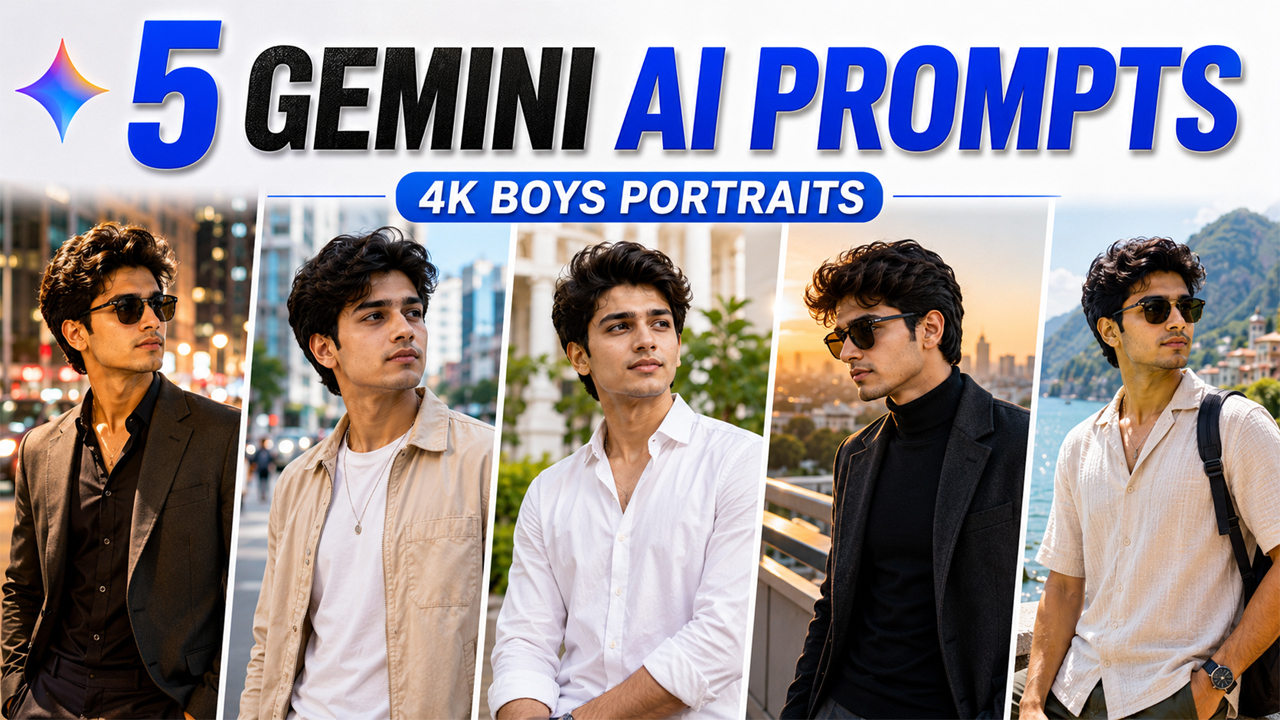
5 Best Google Gemini AI Prompts For Boys
Prompt Variants (5 variants)
1. Luxury City Evening Portrait
The combination of a sophisticated outfit, city environment and controlled lighting gives the portrait a premium fashion-editorial appearance. The prompt also specifically controls the background so it remains visible and attractive instead of becoming completely black.
2. Clean Streetwear Portrait
This prompt works particularly well for profile pictures, social media posts, fashion inspiration and casual lifestyle portraits.
3. Classic White Shirt Portrait
A clean white shirt with natural daylight creates a timeless portrait. It avoids the exaggerated effects that can sometimes make AI portraits look artificial.
4. Premium Black Outfit Portrait
The outfit is intentionally dark, but the environment and lighting remain bright and balanced. This gives the portrait contrast without making the final image gloomy.
5. Luxury Travel Portrait
Want your AI portrait to look like a professional travel photograph? This concept combines fashion, natural scenery and realistic daylight.
Overview
5 Best Google Gemini AI Prompts For Boys: Next-Level 4K Portraits (2026)
Want to turn your ordinary photo into a stylish, professional-looking portrait? Google Gemini can help you create impressive AI-enhanced portraits without needing complicated photo-editing software. With the right prompt and a good reference photo, you can experiment with fashion, lighting, locations, outfits, and photography styles while keeping your face recognizable.
In this collection, we have created 5 original Google Gemini AI prompts for boys designed specifically for realistic 4K-style portraits. These prompts focus on natural skin texture, realistic facial details, balanced lighting, sharp clothing details, and attractive backgrounds.
One important thing is the background. Many AI-generated portraits look unnatural because the scene becomes extremely dark, overly dramatic, blurry, or filled with artificial effects. The prompts below specifically ask Gemini for a bright, well-balanced and realistic environment so the final image looks like a professionally photographed portrait rather than an obviously AI-generated picture.
How These Prompts Work
Simply upload your photo to Google Gemini and paste one of the prompts below. Gemini will use your uploaded image as the visual reference and create a new portrait based on the instructions.
For the best results, use a clear photo where your face is visible and not heavily covered by sunglasses, masks, or extreme shadows.
How to Use These Gemini AI Prompts
Using these prompts is simple.
Step 1: Choose a Good Photo
Select a clear, high-resolution photo of yourself. A front-facing or slightly angled portrait generally works best.
Step 2: Open Google Gemini
Open Gemini and start a new image-generation or image-editing conversation where image upload is supported.
Step 3: Upload Your Photo
Upload the photo you want Gemini to use as the facial reference.
Step 4: Add One Prompt
Copy one complete prompt from this article and paste it into Gemini.
Step 5: Generate the Image
Let Gemini process the uploaded image and prompt. If the first result isn't perfect, you can ask for another variation while keeping the same overall concept.
Step 6: Improve the Result
If the background becomes too dark, add this instruction:
Keep the background naturally bright, clean and well-exposed with realistic daylight. Do not use an overly dark or black background.
If the skin looks artificial, add:
Preserve natural human skin texture and subtle pores. Avoid plastic or overly smooth skin.
Tips for Better 4K AI Portraits
Use a clear reference photo: The better your original image, the easier it is for the AI to preserve your facial characteristics.
Avoid heavily edited selfies: Filters and extreme beauty effects can make facial preservation less consistent.
Mention natural lighting: Words such as "soft daylight," "balanced exposure" and "natural shadows" can help create a more believable photograph.
Don't overdo cinematic effects: Excessive glow, fog, neon lights and extreme contrast can make an otherwise realistic portrait look obviously AI-generated.
Keep the background relevant: A simple city street, modern building, garden or travel location often looks more realistic than an overly complicated fantasy environment.
Ask for natural skin: Explicitly requesting realistic pores and natural texture can help prevent the plastic-skin appearance common in AI portraits.
Frequently Asked Questions
Can I use these Gemini prompts with my own photo?
Yes. These prompts are specifically written so that you can upload your own photo and ask Gemini to create a new portrait based on it.
What type of photo gives the best result?
A clear, well-lit photo with your face visible generally works best. Avoid very low-resolution images or photos where the face is heavily covered.
Can I change the outfit?
Yes. You can replace the outfit description with your preferred clothing, such as a denim jacket, kurta, suit, hoodie or formal shirt.
How can I stop Gemini from creating a dark background?
Add specific instructions such as "bright natural environment," "balanced exposure," "soft daylight" and "avoid extremely dark backgrounds."
Why does my AI portrait sometimes look fake?
AI images can look artificial when the prompt requests excessive beauty effects, unrealistic lighting, extreme skin smoothing or complicated backgrounds. Asking for natural skin texture, realistic lighting and authentic photography can improve the result.
Can I use these prompts for Instagram photos?
Absolutely. You can generate different portrait styles and select the one that fits your social media profile or post.
Can I modify the hairstyle?
Yes. You can add a hairstyle description to the prompt, but it's better to clearly instruct Gemini to preserve your facial identity while changing only the hairstyle.
Final Thoughts
Creating stylish AI portraits doesn't require complicated editing skills. A strong reference photo combined with a detailed prompt can help you experiment with different outfits, locations and photography styles.
The five prompts above are designed around a simple principle: make the person look stylish while keeping the photograph believable. Instead of relying on excessive darkness, dramatic effects or unrealistic backgrounds, they use natural lighting, realistic environments, detailed clothing and authentic skin texture.
For the most natural result, start with the Classic White Shirt Portrait or Clean Streetwear Portrait. If you want a more premium fashion look, try the Luxury City Evening or Premium Black Outfit concept.
Upload your photo, choose your favorite style, paste the prompt into Gemini, and create your own personalized 4K portrait.
Image



