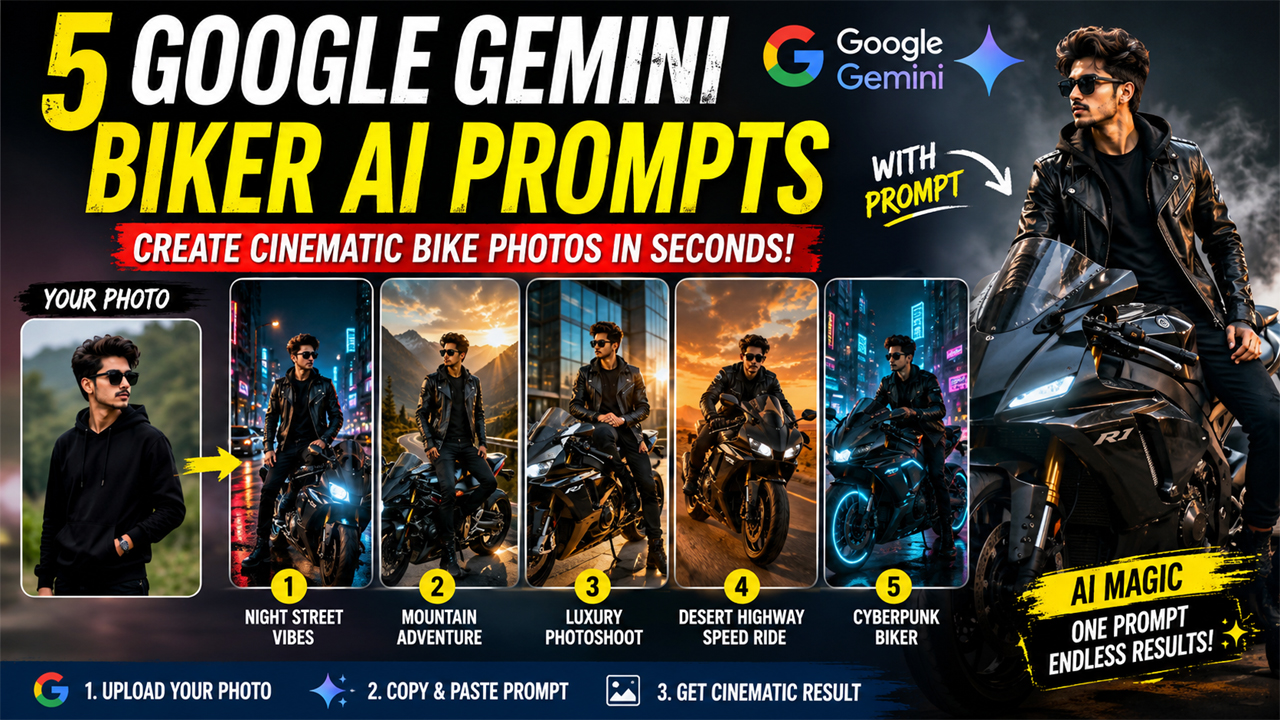
5 Google Gemini Biker AI Photo Editing Prompts
Prompt Variants (5 variants)
Prompt 1 – Cinematic Night Street Rider
Best Result: Perfect for Instagram profile pictures and wallpaper-style edits.
Prompt 2 – Mountain Adventure Biker
Best Result: Ideal for travel lovers and adventure motorcycle enthusiasts.
Prompt 3 – Luxury Sports Bike Photoshoot
Best Result: Perfect for social media profiles, posters, and premium AI edits.
Prompt 4 – Desert Highway Speed Ride
Best Result: Ideal for action-themed AI profile pictures and cinematic wallpapers.
Prompt 5 – Rainy City Cyberpunk Biker
Best Result: Perfect for futuristic AI edits, wallpapers, and viral social media posts.
Overview
5 Google Gemini Biker AI Photo Editing Prompts (2026)
AI photo editing has become one of the biggest trends in 2026, and Google Gemini is now capable of creating highly realistic cinematic edits from a single uploaded photo. Whether you ride a sports bike, cruiser, naked bike, or superbike, Gemini can transform your image into a professional action poster with dramatic lighting, premium colors, and ultra-realistic details.
In this guide, you'll find five original Google Gemini biker AI prompts designed to create viral-quality edits. Simply upload your photo to Google Gemini, paste one of the prompts below, and let AI generate an amazing biker portrait.
Tips for Better Results
Upload a clear, high-resolution selfie with your face fully visible.
Avoid blurry or low-light photos.
Use portrait photos for the best facial accuracy.
If the first result isn't perfect, regenerate once or slightly change the lighting style in the prompt.
Try different aspect ratios depending on where you'll use the image (Instagram, wallpaper, YouTube thumbnail, etc.).
How to Use These Google Gemini AI Prompts
Using these prompts is simple and requires only a few steps:
Open Google Gemini.
Upload a clear, high-quality photo.
Copy any biker prompt from this article.
Paste it into Gemini along with your uploaded image.
Generate the image.
If needed, regenerate with small adjustments like "more cinematic lighting," "golden hour," or "higher realism."
Pro Tips for the Best AI Results
Use daylight selfies for better face recognition.
Choose images with a clean background.
Upload photos with at least 1080p resolution.
Keep your face unobstructed by masks or sunglasses.
Experiment with different motorcycles, lighting, and weather effects.
Frequently Asked Questions
Can I use these prompts in Google Gemini?
Yes. These prompts are designed specifically for Google Gemini's image generation and photo editing capabilities.
Do I need a motorcycle in my original photo?
No. Simply upload your portrait. The AI can generate a completely new motorcycle scene around you.
Will Gemini keep my face the same?
A clear, high-quality photo generally produces the best facial consistency.
Can I modify the motorcycle model?
Yes. Replace terms like "sports bike" with "Harley-Davidson," "cafe racer," "adventure bike," or another style you prefer.
Are these prompts free to use?
Yes. You can customize and use them for your personal AI image creations.
Conclusion
Google Gemini has made AI photo editing more creative than ever. With the right prompt, a simple selfie can become a cinematic biker portrait that looks professionally photographed. The five prompts in this guide cover multiple styles—from luxury superbikes and mountain adventures to futuristic cyberpunk scenes—giving you plenty of options to create unique AI-generated images.
Experiment with lighting, weather, outfits, and motorcycle styles to create your own signature look. Small prompt changes can produce dramatically different results, making every generation unique.
Image



