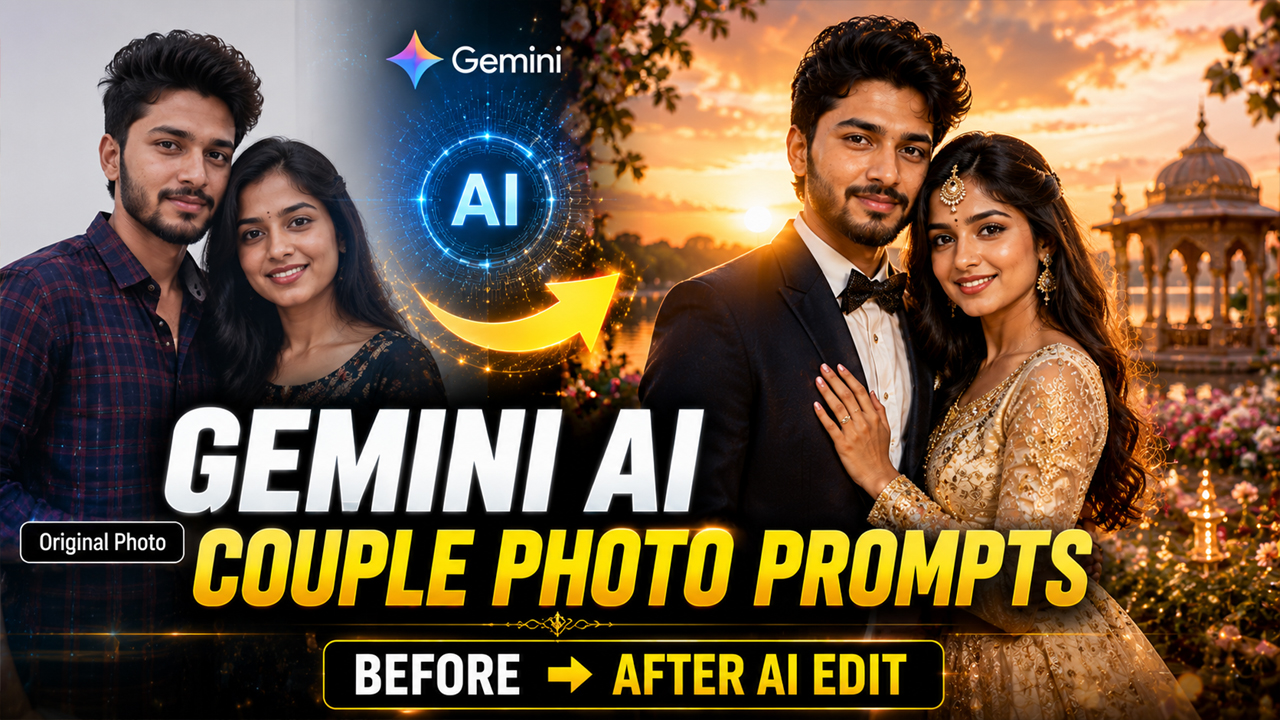
5 Stunning Couple Photo Editing Prompts for Google Gemini AI
Prompt Variants (5 variants)
Prompt 1: Romantic Sunset Couple Portrait
Why This Prompt Works Sunset photography is one of the most popular styles for couple portraits because it creates a warm and emotional feeling. The golden hour lighting makes the image look more professional while keeping the couple's natural appearance. This prompt is perfect for: Instagram couple posts Anniversary photos Romantic memories Profile pictures Gemini AI enhances the background, lighting, and overall mood while keeping the original couple photo realistic.
Prompt 2: Luxury Wedding Style Couple Photo
Why This Prompt Works Many couples want wedding-style photos without arranging a complete photoshoot. This AI prompt helps create a luxurious wedding atmosphere digitally. The prompt focuses on: Professional wedding photography style Premium background Natural facial details Cinematic lighting Realistic editing You can customize it further by adding your preferred wedding theme, such as royal palace, beach wedding, traditional ceremony, or modern luxury style.
Prompt 3: Cinematic Movie Couple Scene
Why This Prompt Works Movie-style couple photos are trending because they give normal pictures a dramatic and emotional appearance. This prompt creates a film-inspired look with professional color grading and cinematic effects. It is useful for creating: Couple reels thumbnails Romantic social media posts Special memory photos Creative AI portraits
Prompt 4: Couple Travel Adventure Photography
Why This Prompt Works Travel couple photography is one of the most popular styles for social media because it combines romance with beautiful locations. With this Gemini AI prompt, you can transform a simple couple photo into a memorable travel experience. This prompt is ideal for creating: Mountain couple portraits Vacation memories Adventure-themed photos Instagram travel posts Romantic wallpapers You can also customize the location by adding specific places like beaches, snowy mountains, forests, European streets, or luxury resorts. For example, you can modify the prompt by adding: "Create a Paris street couple photoshoot" "Create a Maldives beach couple portrait" "Create a snowy mountain romantic scene" This allows you to create unlimited AI couple photo variations.
Prompt 5: Black and White Classic Couple Portrait
Why This Prompt Works Black and white photography never goes out of style. It creates a classic, emotional, and premium feeling that works perfectly for couple portraits. This AI editing style is perfect for: Anniversary pictures Couple profile photos Wedding memories Elegant social media posts The vintage effect combined with realistic lighting can make a simple image look like a professional studio photograph.
Overview
5 Stunning Couple Photo Editing Prompts Using Google Gemini AI
AI photo editing has completely changed the way people create and customize their pictures. Earlier, creating professional-looking couple portraits required expensive cameras, photographers, and advanced editing skills. Now, with tools like Google Gemini AI, anyone can transform a normal couple photo into a cinematic, romantic, and realistic masterpiece.
Google Gemini AI can understand your uploaded image and apply creative changes while maintaining the natural facial features, expressions, and emotions of the couple. Whether you want a dreamy wedding-style portrait, a romantic travel photo, or a cinematic movie look, the right AI prompt can create amazing results.
In this article, we are sharing some of the best Google Gemini AI couple photo editing prompts that you can use by uploading your own couple photo. These prompts are designed to create realistic, high-quality, and social media-ready images.
How To Use Gemini AI Couple Photo Prompts?
Before using these prompts, follow these simple steps:
Open Google Gemini AI.
Upload your couple photo.
Copy any prompt from this article.
Paste the prompt into Gemini.
Wait for AI to generate your edited image.
Download and share your new AI couple portrait.
For better results:
Use a clear photo with good lighting.
Make sure both faces are visible.
Avoid blurry or low-quality images.
Mention your preferred style clearly in the prompt.
Tips For Getting Better Gemini AI Results
To get the most realistic output, always include instructions like:
"Keep original face identity"
"Maintain natural expressions"
"Realistic skin texture"
"Professional camera quality"
"Ultra realistic photography"
These instructions help AI avoid creating unnatural faces and keep the edited image closer to the original uploaded photo.
Additional Tips For Creating Perfect AI Couple Photos
Google Gemini AI can create amazing results, but the quality of your final image depends on how you write your prompt and the photo you upload.
Follow these tips for better results:
1. Upload A High-Quality Photo
Use a clear image where both faces are visible. Blurry photos may create unrealistic results.
2. Mention Face Preservation
Always include instructions like:
Keep original face identity
Maintain natural facial features
Do not change expressions
This helps AI maintain the person's real appearance.
3. Choose A Specific Style
Instead of writing only "make it beautiful", describe the exact style:
Cinematic
Wedding photography
Luxury portrait
Vintage style
Travel photography
Detailed prompts produce better results.
4. Experiment With Different Backgrounds
You can create multiple versions of the same photo:
Beach sunset
Royal palace
Mountain location
City night lights
Studio portrait
AI allows unlimited creativity.
Frequently Asked Questions (FAQs)
1. What is the best AI tool for couple photo editing?
Google Gemini AI is one of the popular AI tools for creating realistic photo edits. By using detailed prompts and uploading a clear image, users can create professional-looking couple portraits.
2. Can I use these Gemini AI prompts with my own photo?
Yes. These prompts are designed for photo editing. Upload your couple image to Gemini AI and then paste the prompt to generate a customized result.
3. How can I make Gemini AI photos look realistic?
For realistic results, use a high-quality image and add instructions like "ultra realistic", "natural skin texture", "professional camera quality", and "keep original face identity".
4. Are Google Gemini AI couple photos free?
Google Gemini offers AI features that may be available depending on your account and region. Availability and limits can change over time.
5. Why does my AI-generated face look different?
Sometimes AI changes facial details if the uploaded image quality is poor or the prompt does not clearly mention face preservation. Always use a clear photo and include instructions to keep the original identity.
6. Can I create wedding-style photos using Gemini AI?
Yes. Wedding themes, luxury portraits, cinematic styles, and traditional photography looks can be created by using detailed editing prompts.
Conclusion
AI photo editing has made it easier than ever to create stunning couple portraits without spending money on expensive photoshoots. With Google Gemini AI and the right prompts, you can transform simple pictures into romantic, cinematic, and professional-looking images.
The five prompts shared in this article can help you create different styles including sunset romance, luxury wedding portraits, movie-style scenes, travel photography, and classic black-and-white images.
For the best results, always upload a clear photo and describe your desired style in detail. The more specific your prompt is, the better your AI-generated image will become.
Try these Google Gemini AI couple photo editing prompts today and create beautiful memories with a unique AI touch.
Image



