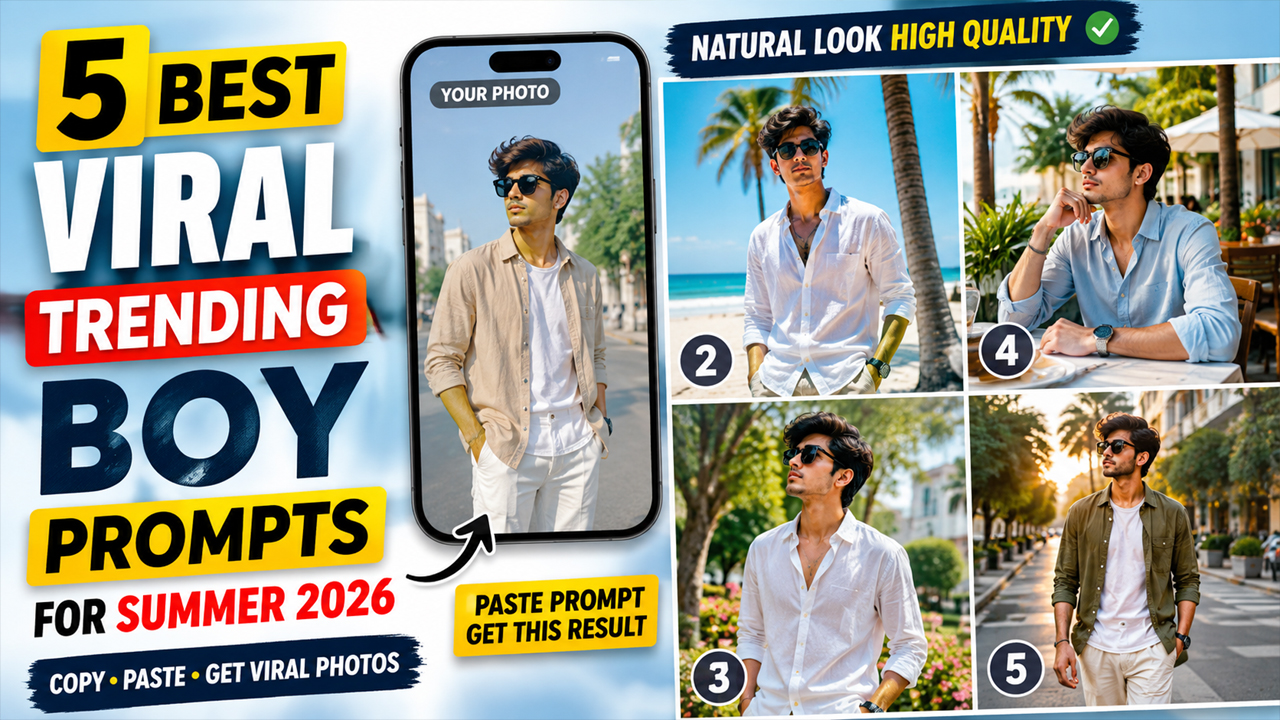
Best Viral Trending Boy Prompts for Summer 2026
Prompt Variants (5 variants)
1. Luxury Summer Street Style Prompt
If you want a modern Instagram-style portrait with a premium fashion look, this summer streetwear concept is a great option. The scene combines a clean city environment with a relaxed outfit and natural daylight. Why This Prompt Works The combination of linen clothing, neutral colors and a modern city environment creates a premium summer aesthetic without making the image look artificial. Natural daylight also helps preserve realistic skin tones. - This style works - especially well for Instagram profile pictures, WhatsApp DP images and fashion posts.
2. Beachside Summer Casual Prompt
Best Use - This prompt is ideal if you want a vacation-style summer photograph without needing to actually travel to a beach. You can also change the outfit in the prompt to a pastel shirt, polo T-shirt or lightweight summer jacket depending on your personal style.
3. Clean White Shirt Summer Portrait
Why Choose This Look? - A white shirt is one of the easiest outfits to use for a realistic AI portrait because it does not overpower the face. The bright outdoor background also makes the image feel more natural and suitable for summer. This style can work particularly well as a profile photograph because the face remains the main focus.
4. Luxury Café Summer Look
The café concept gives the portrait a relaxed yet premium appearance. It can work especially well for social media posts where you want your image to look stylish without appearing overly edited.
5. Viral Summer Sunset Street Portrait
For people who want a more dramatic summer look, a golden-hour street scene can add depth while still maintaining a bright and realistic appearance.
Overview
5 Best Viral Trending Boy Prompts for Summer 2026
Summer 2026 is bringing a fresh wave of stylish AI-generated portraits, and boys are experimenting with everything from casual streetwear to luxury summer fashion. With Google Gemini, you can turn an ordinary selfie into a polished summer portrait while keeping your face recognizable and the overall image natural.
The key to getting a great result is not simply asking Gemini to “make a stylish photo.” A detailed prompt can control the outfit, location, lighting, pose, camera quality, background and overall mood. This helps create an image that looks like a professionally photographed summer portrait instead of an obviously AI-generated picture.
In this guide, we have created 5 original viral summer photo prompts for boys in 2026. These prompts are designed for users who want realistic, stylish and social-media-ready portraits.
For the best results, upload a clear front-facing photo of yourself with good facial visibility before using any prompt.
How to Use These Summer 2026 Prompts in Gemini
Getting a good result depends not only on the prompt but also on the photograph you upload.
Step 1: Choose a Clear Photo
Use a high-resolution photograph where your face is clearly visible. Avoid heavily filtered selfies or photographs where your face is hidden.
Step 2: Upload Your Photo
Open Google Gemini and upload the photograph you want to transform.
Step 3: Paste One Prompt
Copy one of the prompts above and add it with your uploaded image.
Step 4: Check the Face
After Gemini generates the result, check whether your facial identity looks natural. If necessary, ask Gemini to preserve your original facial structure more accurately.
Step 5: Improve the Result
You can make small follow-up requests such as:
Make the lighting more natural.
Keep my face closer to the original photo.
Make the background brighter.
Reduce excessive skin smoothing.
Make the clothing texture more realistic.
Keep the image photorealistic.
Make the colors natural.
Tips for Better Summer AI Photos
Use Natural Lighting
Bright daylight usually produces more believable skin tones than extremely dramatic lighting.
Avoid Extremely Dark Backgrounds
If you want a clean social-media photograph, ask for a bright, naturally illuminated environment. Dark backgrounds can sometimes make AI-generated portraits appear more artificial.
Don't Overload the Prompt
Adding too many accessories, objects and complicated effects can increase the possibility of strange AI artifacts. Keep the main subject and environment clear.
Use High-Quality Reference Photos
A clear reference image gives the AI more information about your facial features.
Keep the Skin Realistic
Instead of asking for “perfect skin,” request natural skin texture and realistic pores. This can help prevent the plastic appearance commonly seen in AI portraits.
Try Different Locations
The same outfit can produce completely different results in a café, beach, city street, garden or rooftop environment.
Why Summer AI Photo Prompts Are Trending
AI image generation has made it possible to experiment with fashion and photography concepts without needing a professional studio, expensive camera equipment or a specific location.
Summer is particularly suitable for AI portraits because the season offers many visually attractive themes—bright streets, beaches, cafés, vacations, casual outfits and outdoor locations.
The most successful results usually combine simple fashion, realistic lighting and a believable environment rather than relying on excessive visual effects.
For boys who want social-media-ready portraits, these prompts provide different styles while keeping the focus on a natural and recognizable appearance.
Frequently Asked Questions
Can I use these prompts with my own photo?
Yes. These prompts are specifically written to work with an uploaded reference photo. For the best result, use a clear image where your face is visible.
Which prompt is best for Instagram?
The luxury street style and café prompts are good choices for Instagram because they combine fashion with a realistic lifestyle setting.
Can I change the clothes?
Yes. You can replace the outfit description with your preferred shirt, T-shirt, jeans, trousers, sneakers or accessories.
How can I prevent an AI-generated face from looking fake?
Use a clear reference photo and specifically request natural facial features, realistic skin texture and accurate facial identity. Avoid excessive beauty filters and unrealistic effects.
Why does my AI image sometimes look too dark?
Some prompts automatically produce cinematic or dramatic lighting. Add instructions such as “bright natural daylight, balanced exposure, realistic skin tones and a well-lit background.”
Can these prompts be used for profile pictures?
Yes. The clean white-shirt and outdoor portrait concepts are particularly suitable for profile pictures.
Can I use these prompts for other AI image generators?
The concepts can generally be adapted to other image-generation tools. However, the exact results may vary depending on the model and its image-reference capabilities.
Final Thoughts
Summer 2026 is a great time to experiment with AI fashion photography. You don't need an expensive camera or professional photoshoot to explore different looks. A good reference photograph combined with a detailed prompt can create a convincing summer portrait with realistic clothing, lighting and surroundings.
The most important thing is to keep the image natural rather than overly edited. Bright environments, realistic skin texture, balanced colors and simple outfits generally produce a much more believable result.
Try these five prompts with your own photo and experiment with different summer locations and outfits to create a style that matches your personality.
Image



