Couple ChatGPT Photo Editing Prompts Trending on Instagram
Prompt Variants (5 variants)
1. Romantic Sunset Couple Portrait Prompt
Best for: Instagram couple posts, anniversary photos and romantic profile pictures.
2. Luxury Cafe Couple Photo Prompt
Best for: Instagram reels covers, couple posts and stylish profile photos.
3. Traditional Indian Couple Love Portrait Prompt
Best for: Festival posts, wedding-style couple portraits and traditional Instagram photos.
4. Rainy Street Couple Photography Prompt
Best for: Romantic Instagram posts, couple reels and modern relationship photography.
5. Beachside Couple Vacation Prompt
Best for: Travel couple posts, vacation memories and romantic Instagram photos.
Overview
5 Viral Couple ChatGPT Photo Editing Prompts Trending on Instagram in 2026 | Couple Love Photos
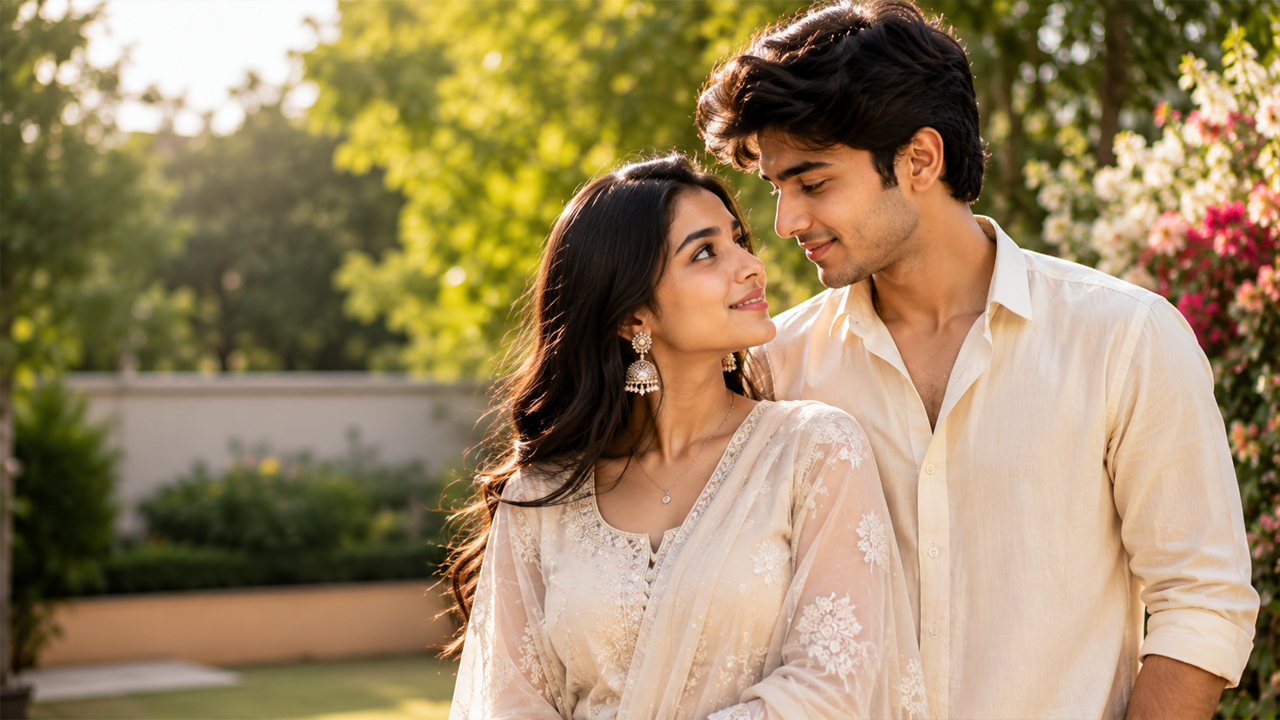
Couple photos are one of the most popular styles for social media, especially when the image has a natural romantic mood, stylish outfits, beautiful surroundings, and realistic facial details. With AI photo editing tools like ChatGPT, you can transform an ordinary couple picture into a polished Instagram-ready portrait without making it look overly artificial.
In 2026, realistic couple edits are becoming more popular than heavily edited images. The best results usually come from prompts that preserve the original faces, natural skin texture, body proportions, clothing details, and realistic lighting while changing the atmosphere around the couple.
If you want to create a romantic couple portrait from your own photo, upload a clear picture of both people and use one of the prompts below. These prompts are designed to create bright, realistic and premium-looking couple photos rather than dark or excessively dramatic AI images.
How to Use These Couple Photo Prompts
Using these prompts is simple.
Step 1: Choose a Clear Couple Photo
Select a photo where both faces are clearly visible. A high-resolution image with good lighting generally produces better results.
Step 2: Upload the Photo
Open ChatGPT and upload the couple photo you want to edit.
Step 3: Add Your Selected Prompt
Copy one of the prompts from this article and paste it along with your uploaded image.
Step 4: Mention Any Personal Preferences
You can add details such as:
preferred outfit
location
hairstyle
photography style
pose
season
background
Instagram aspect ratio
For example, you can ask for a 4:5 portrait composition if the image is intended for an Instagram feed post.
Step 5: Review the Result
If the generated image changes the faces too much, ask the AI to preserve the original facial identity more accurately and regenerate the image.
Tips for More Realistic Couple AI Photos
The prompt is important, but the source image also makes a major difference.
Use good lighting: Start with a photo where the faces are not hidden by shadows.
Upload a high-resolution image: Blurry source images can lead to less accurate facial details.
Keep the request specific: Mention the location, lighting, clothing and pose you want instead of asking for a completely random transformation.
Ask for natural skin texture: This helps avoid the overly smooth AI-generated appearance.
Avoid excessive effects: Too much glow, lens flare or dramatic lighting can make an image look artificial.
Keep the background balanced: A bright but softly blurred background usually looks more realistic than a completely black or extremely dark background.
Check hands and faces: These are two areas where AI edits can sometimes produce unwanted changes.
Why Natural Lighting Looks Better
One of the easiest ways to make an AI-generated couple photograph look more realistic is to use balanced lighting.
Extremely dark backgrounds combined with bright faces can make an image appear artificial. Instead, soft daylight, golden-hour illumination, window light or bright outdoor lighting can create a more believable photograph.
Natural lighting also helps preserve realistic skin tones and clothing colors. For Instagram content, a clean and bright composition can make the couple stand out without relying on heavy effects.
Frequently Asked Questions
Can I use these prompts with my own couple photo?
Yes. Upload a clear photo of the couple and use the selected prompt as the editing instruction.
Can I change the background?
Yes. You can replace the background with a beach, cafe, city street, garden, traditional venue or another location by modifying the prompt.
How can I stop the AI from changing our faces?
Add instructions such as "preserve the original facial identity and recognizable facial features of both people." A clear source photograph can also help.
Why does my AI photo sometimes look too dark?
This can happen when the prompt emphasizes cinematic shadows, night photography or dramatic lighting. Ask for bright natural lighting, balanced exposure and clearly visible surroundings.
Can these images be used for Instagram?
Yes, you can create social-media-ready images and request an appropriate portrait composition, such as a vertical 4:5 format for an Instagram feed post.
How do I make the photo look less AI-generated?
Use realistic photography instructions, natural skin texture, authentic lighting, accurate hands and subtle editing. Avoid excessive glow, unrealistic skin smoothing and extreme color effects.
Can I change the clothes in the original photo?
You can request a different outfit style in the prompt. For better results, describe the desired clothing clearly while asking the AI to preserve the couple's identity and realistic body proportions.
Which prompt is best for a romantic Instagram photo?
The sunset portrait and beach vacation prompts work particularly well for a soft romantic aesthetic, while the cafe and street prompts are better suited to modern lifestyle photography.
Final Thoughts
AI photo editing makes it easier to turn a simple couple picture into a polished social-media portrait. The key is not to add as many effects as possible, but to create an image that still feels like a genuine photograph.
The five prompts above cover different styles, including sunset romance, luxury cafe photography, traditional Indian portraits, rainy city scenes and beach vacations. You can also customize the location, clothing, pose and lighting to create a more personal result.
For the most realistic output, always start with a clear original photograph and use balanced lighting instructions. Keeping the background bright and natural can make a significant difference and prevent the final image from looking overly artificial.
Try different prompts with the same photo and compare the results to find the style that fits your Instagram profile best.
Image