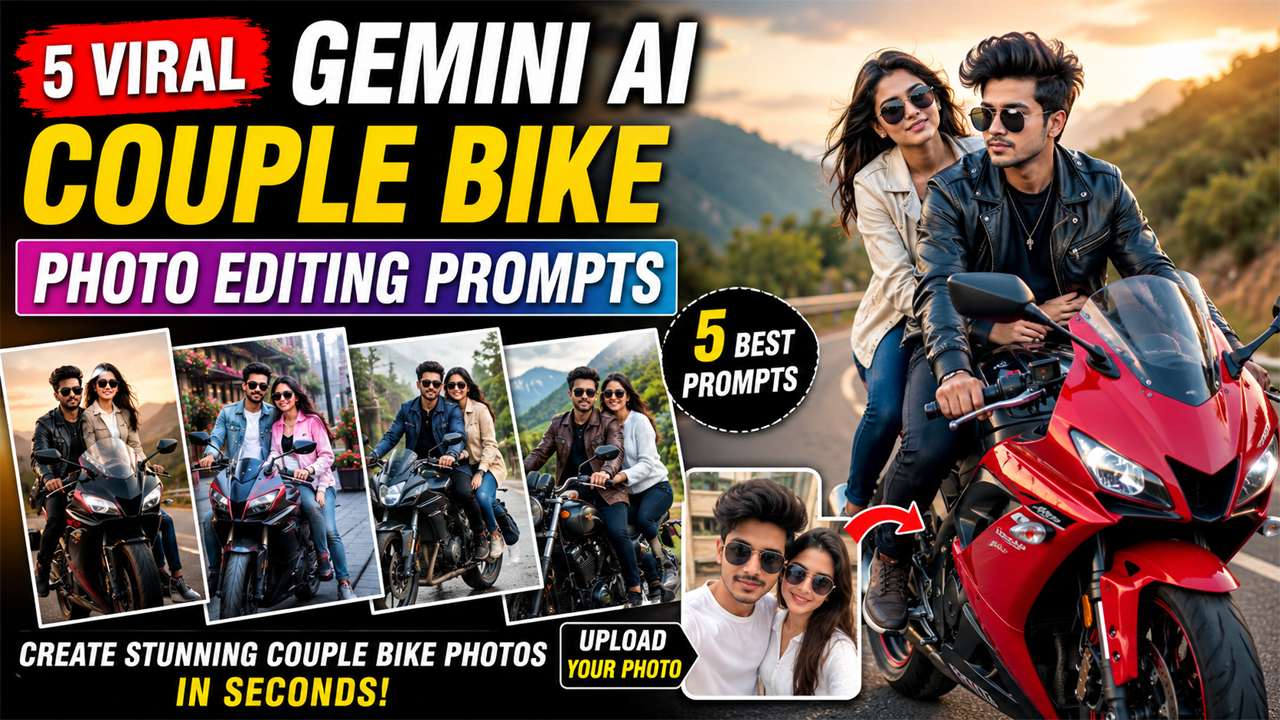
Gemini AI Couple Bike Photo Editing Prompts
Prompt Variants (5 variants)
Prompt 1 – Luxury Sports Bike Sunset Photoshoot
This prompt creates a premium biker lifestyle image without making the scene overly dramatic. The warm sunlight keeps skin tones natural while the mountain road adds depth and realism.
Prompt 2 – Romantic Cafe Bike Ride
A café setting gives the image a trendy lifestyle feel that's popular on Instagram and Pinterest. Bright daylight and natural colors help avoid the artificial AI-generated appearance.
Prompt 3 – Rain Ride Cinematic Scene
Prompt 4 – Royal Cruiser Bike Mountain Adventure
Golden morning light creates a warm and premium look without making the image appear artificial. The mountain scenery also adds depth, making the final result feel like a professional travel photoshoot.
Prompt 5 – Premium City Bike Couple Portrait
This prompt creates a modern luxury vibe that's ideal for Instagram, Facebook, and profile pictures. The soft evening light gives the image a polished look while keeping faces natural.
Overview
5 Viral Gemini AI Couple Bike Photo Editing Prompts (2026)
AI photo editing has become one of the biggest trends on social media, and Google Gemini AI is now capable of creating highly realistic couple portraits from a simple prompt. Whether you want a romantic bike ride, a luxury superbike photoshoot, or a cinematic sunset scene, Gemini can generate professional-quality images in just a few seconds.
In this article, you'll find 5 unique Gemini AI Couple Bike Photo Editing Prompts designed to produce natural-looking images with realistic lighting, clean skin tones, and premium backgrounds. These prompts avoid the overly dark or fake AI look by using soft daylight, golden hour lighting, balanced colors, and detailed environmental descriptions.
Tip: Upload a clear selfie of both people before using these prompts in Gemini for the most realistic results.
Tips for Getting the Best Results
Upload a high-resolution selfie where both faces are clearly visible.
Use bright, well-lit source photos for better facial accuracy.
Avoid blurry or low-quality images.
If Gemini changes facial details, add "Preserve the uploaded faces exactly without altering identity."
Always mention "natural daylight", "soft lighting", "realistic skin texture", "8K DSLR photography" for premium-looking results.
Avoid prompts that mention dark streets, heavy fog, or low light if you want a clean and realistic output.
How to Use These Gemini AI Prompts
Creating a realistic AI couple bike photo with Google Gemini is simple:
Open Google Gemini.
Upload a clear, high-resolution photo of both people.
Copy any prompt from this article.
Paste the prompt into Gemini.
Click Generate and wait for the image.
If needed, regenerate once or twice for the best composition.
For the best results, use photos where both faces are clearly visible and taken in good lighting.
Pro Tips for More Realistic Images
Upload a sharp selfie with natural daylight.
Avoid blurry, low-resolution photos.
Always mention "Preserve uploaded faces exactly."
Use phrases like "Ultra-realistic", "DSLR Photography", "Natural Skin Texture", "8K HDR", and "Soft Golden Light".
Keep the background bright with greenery, roads, mountains, or modern cityscapes.
Avoid prompts with excessive fog, darkness, neon overload, or unrealistic glowing effects if you want a natural result.
Frequently Asked Questions (FAQs)
1. Are these prompts free to use?
Yes. You can copy and use them with Google Gemini.
2. Do I need to upload my own photo?
Yes. Uploading your own couple photo helps Gemini preserve facial identity more accurately.
3. Can I change the motorcycle?
Absolutely. Replace the bike description with a sports bike, cruiser, adventure bike, café racer, or scooter.
4. Why do AI faces sometimes look different?
If the uploaded photo is blurry or low quality, Gemini may not preserve facial details accurately. Clear source photos usually produce much better results.
5. Can I use these prompts for Instagram or YouTube thumbnails?
Yes. These prompts are suitable for social media posts, profile pictures, wallpapers, thumbnails, and personal edits.
6. Which lighting gives the most realistic output?
Natural daylight and golden hour lighting generally produce the cleanest and most photorealistic images.
Conclusion
Google Gemini makes it easy to create stunning couple bike portraits with just a photo and a well-written prompt. The prompts in this guide are designed to generate realistic skin tones, balanced lighting, premium motorcycle details, and bright cinematic backgrounds without the overly dark or fake AI appearance.
Experiment with different bikes, outfits, and locations to create your own unique style while keeping the lighting natural for the best possible results.
Image



