Gemini Brother Sister Photo Prompts
Prompt Variants (5 variants)
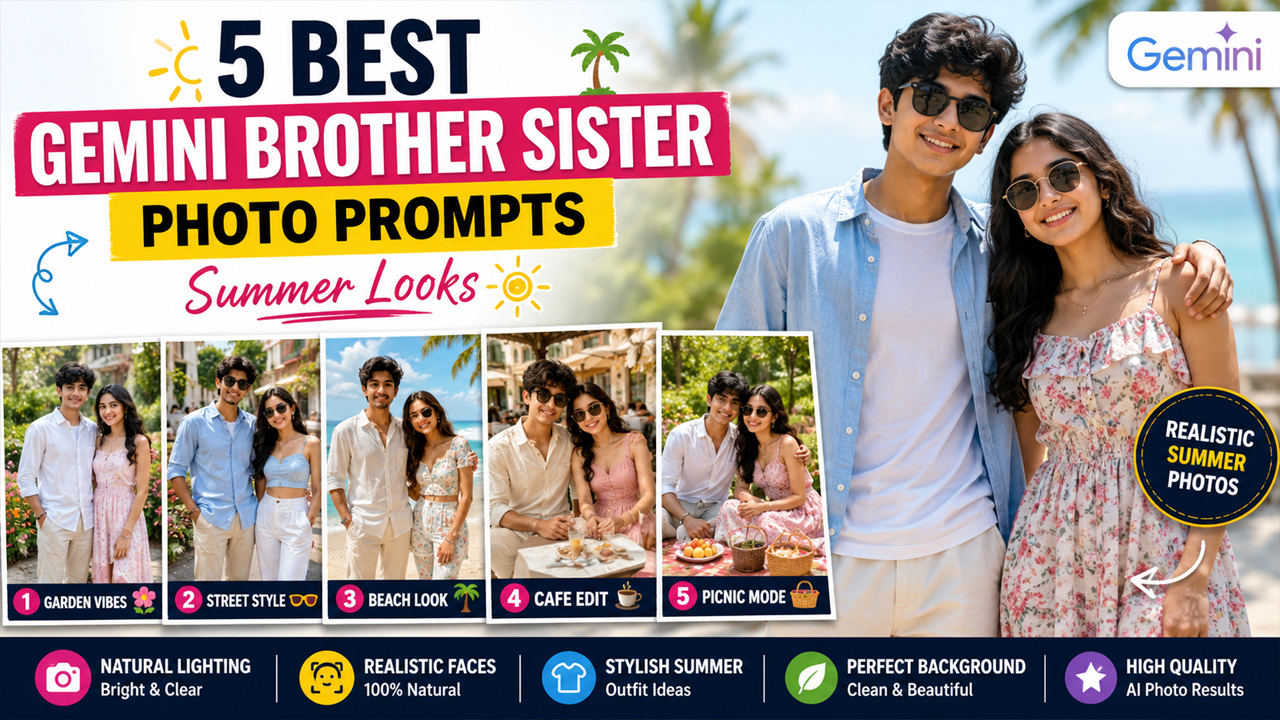
1. Bright Summer Garden Brother Sister Portrait
Why this prompt works - A garden setting gives the image a fresh summer atmosphere without making it look artificial. Pastel clothing and natural greenery also create a soft color balance that works well for family portraits.
2. Casual Summer Street Style
Best for - This prompt is ideal if you want a modern Instagram-style brother-sister summer photograph with a fashionable but natural appearance.
3. Beach Vacation Brother Sister Photo
Result - This prompt can turn a simple sibling photo into a bright summer vacation portrait that looks natural and suitable for social media.
4. Premium Café Summer Look
Styling idea - For a premium look, light cream, beige, white, pastel blue, and soft pink clothing can work especially well with a bright summer café environment.
5. Colorful Summer Picnic Portrait
Overview
5 Best Gemini Brother Sister Photo Prompts for Summer Looks
Summer is the perfect season for creating fresh, colorful, and natural-looking family portraits. If you want to turn an ordinary brother-sister photo into a stylish summer-themed picture, Google Gemini can help you create beautiful edits while keeping the original faces recognizable.
With the right Gemini brother sister photo prompt, you can create everything from casual outdoor portraits to premium vacation-style photos. The key is to use natural lighting, realistic skin texture, clean backgrounds, and simple summer outfits instead of overly dramatic effects.
In this guide, we have shared 5 original Gemini AI photo prompts for brother and sister summer looks. Each prompt is designed to create a realistic photograph with a bright and attractive environment rather than a dark or artificial-looking background.
How to Use These Gemini Brother Sister Prompts
Using these prompts is simple if you already have a brother-sister photograph that you want to transform.
Step 1: Choose a Good Photo
Select a clear photograph where both faces are visible. A front-facing or slightly angled photograph generally gives better results.
Step 2: Upload the Photo to Gemini
Open Google Gemini and upload your brother-sister photo. Make sure the image has reasonable quality and that the faces are not heavily covered.
Step 3: Copy One Prompt
Choose one of the summer prompts from this article and paste it along with your uploaded photo.
Step 4: Ask Gemini to Preserve Identity
The prompts already include instructions to preserve facial identity. If the generated result changes the faces too much, you can add:
“Keep both faces closely consistent with the uploaded reference image and do not unnecessarily change their identity.”
Step 5: Try Different Summer Styles
You can experiment with the garden, beach, café, street, and picnic concepts to find the style that suits your original photograph.
Tips for Better Gemini Summer Photos
Use a Clear Original Image
A high-resolution photo with visible faces usually gives better results than a blurry or heavily compressed image.
Prefer Natural Lighting
Bright daylight often produces more realistic-looking skin and clothing. This is why these prompts avoid overly dark cinematic lighting.
Don't Overuse Effects
Too many effects can make an otherwise realistic photograph look artificial. Simple environments and realistic lighting usually create a more convincing result.
Choose Light Summer Colors
White, cream, beige, pastel blue, pastel pink, and light green can work beautifully with summer backgrounds.
Keep the Background Natural
Instead of asking for a completely blurred or dramatic background, use realistic details such as gardens, cafés, beaches, parks, and outdoor streets.
Frequently Asked Questions
Can I use these Gemini prompts with my own brother-sister photo?
Yes. Upload your photograph to Gemini and use the prompt alongside it. For the best result, choose a clear image where both faces are visible.
How can I stop the generated photo from looking fake?
Use instructions such as realistic skin texture, natural daylight, accurate facial features, realistic hands, natural shadows, and professional photography. Avoid excessive cinematic effects and unrealistic lighting.
Why does my AI background sometimes become too dark?
AI image generators can interpret dramatic photography instructions as dark cinematic lighting. Explicitly ask for a bright outdoor environment, natural daylight, visible background details, soft shadows, and clean summer colors.
Can I change the clothes in these prompts?
Yes. You can replace the suggested outfits with your preferred summer clothing while keeping the rest of the prompt unchanged.
Can I create a beach version from an indoor photo?
Yes. A good reference image can be transformed into an outdoor summer setting. However, the quality of the original photo can affect the final result.
How do I get a natural sibling pose?
Ask for a relaxed and authentic sibling pose rather than an exaggerated fashion pose. Expressions such as a gentle smile or casual interaction can make the result more believable.
Final Thoughts
These Gemini brother sister photo prompts for summer looks are designed to create bright, stylish, and realistic sibling portraits without relying on overly dramatic AI effects. From a sunny garden and colorful picnic to a beach vacation or modern café, each concept gives you a different way to transform an ordinary photograph.
For the most realistic results, always start with a clear reference photo and use natural lighting, realistic skin texture, accurate facial details, and simple summer styling. If the first result does not look right, adjust the clothing, location, pose, or lighting instead of completely changing the prompt.
The goal is not just to make an image look impressive—it is to make the final photograph feel natural, clean, bright, and believable.
Image