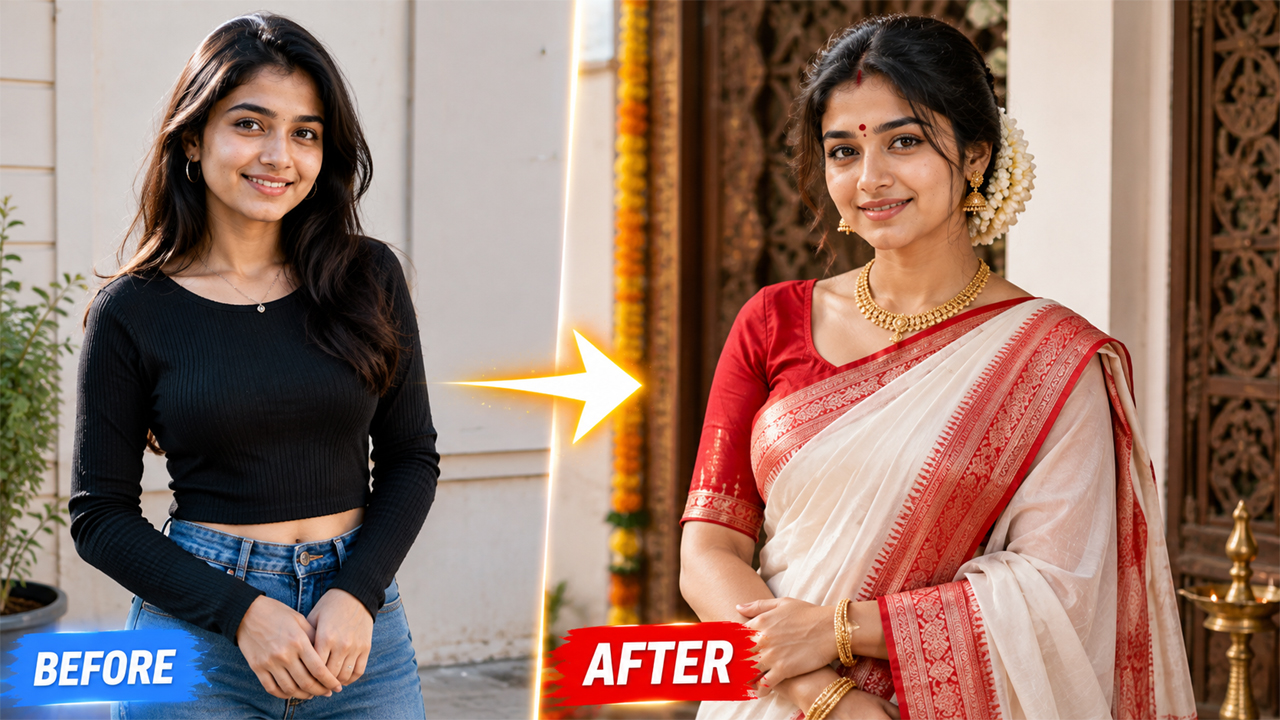
Gemini Prompt to Make a Girl Wear a Bengali Saree
Overview
Gemini Prompt to Make a Girl Wear a Bengali Saree – Realistic Traditional Look
If you want to transform a normal photo into a beautiful Bengali saree look using Google Gemini, the right prompt can make a huge difference. Instead of simply asking Gemini to “change the dress into a saree,” you can describe the saree style, draping pattern, jewelry, hairstyle, lighting, background, and overall photography style.
In this guide, you’ll find a detailed Gemini AI prompt to make a girl wear a Bengali saree while keeping her face and overall appearance natural. The goal is to create a realistic traditional portrait that looks like an actual photoshoot rather than an artificial AI-generated image.
What Makes a Bengali Saree Look Special?
Bengali sarees have a distinctive traditional appearance. The classic white saree with a red border is one of the most recognizable Bengali-inspired styles. The combination can create an elegant and timeless look without making the image overly complicated.
For a realistic transformation, Gemini should be instructed to preserve important details from the original photograph, including the person's facial identity, natural skin texture, body proportions, and overall pose.
Small details such as traditional jewelry, a neat hairstyle, subtle makeup, and an authentic saree drape can make the final image much more convincing.
How to Use the Bengali Saree Gemini Prompt
Using the prompt is simple.
Step 1: Open Google Gemini
Open Gemini and start an image-editing or image-generation conversation that supports uploading your photograph.
Step 2: Upload Your Photo
Choose a clear photograph where your face is visible. A front-facing or slightly angled portrait generally works well.
For better results, avoid extremely blurry images, very low-resolution photos, or pictures where the face is heavily covered.
Step 3: Paste the Prompt
Copy the complete Bengali saree prompt from this article and paste it after uploading your image.
Step 4: Generate the Image
Ask Gemini to apply the transformation while preserving your identity and pose.
If the first result isn't perfect, you can ask Gemini to make a specific correction instead of regenerating everything.
For example:
Keep the same face and pose, but make the Bengali saree draping more natural and realistic. Improve the fabric folds and keep the lighting bright and natural.
Tips for Getting a More Realistic Bengali Saree Photo
Use a High-Quality Original Photo
The quality of your input image directly affects the final result. A sharp portrait with good lighting generally produces better facial details.
Avoid Extreme Filters
Don't start with a heavily edited selfie. Strong beauty filters can make it harder for an AI editor to maintain realistic skin texture.
Keep the Prompt Specific
Instead of writing only:
“Make me wear a Bengali saree.”
describe the saree, jewelry, lighting, background, photography style, and realism requirements.
Don't Overload the Image With Accessories
Too much jewelry can sometimes result in duplicated or distorted accessories. A tasteful amount of traditional jewelry usually produces a more natural result.
Ask for Natural Lighting
If you want your image to look like a real photograph, phrases such as soft daylight, balanced exposure, natural shadows, realistic skin tones, and professional photography can help guide the result.
Bengali Saree Photo Background Ideas
You can customize the background without changing the main outfit.
Try asking Gemini for:
A bright traditional Bengali home interior
A beautiful heritage-style room
A clean festive Bengali setting
A traditional courtyard with soft daylight
An elegant Indian wedding-inspired background
A simple cream-colored studio background
A tasteful Bengali cultural setting
For the most realistic result, avoid unnecessarily dramatic backgrounds with excessive fog, glowing effects, or extremely dark lighting.
Optional Prompt for a Bright Traditional Background
If you already generated the saree image but don't like the background, use this additional instruction:
Keep the person, face, saree, jewelry, pose, and body proportions exactly the same. Replace only the background with a bright, elegant Bengali-inspired traditional interior. Use soft natural daylight, warm neutral colors, realistic depth of field, subtle natural shadows, and a clean premium photographic appearance. Keep the background detailed enough to look authentic but not distracting. Avoid dark tones, heavy cinematic effects, artificial glow, excessive blur, and unrealistic decorations.
Common Problems and How to Fix Them
The Face Looks Different
Ask Gemini to preserve the original facial identity and make minimal changes to facial structure.
The Saree Looks Fake
Ask for physically realistic fabric folds, natural draping, authentic textile texture, and realistic shadows.
The Image Is Too Dark
Use a correction prompt such as:
Increase the overall exposure and use soft natural daylight. Keep the skin tones realistic and make the background bright, clean, and clearly visible. Avoid dark cinematic lighting.
Jewelry Looks Artificial
Tell Gemini to use minimal, realistic traditional jewelry with correct proportions and natural reflections.
Skin Looks Too Smooth
Ask for realistic skin texture, subtle pores, natural facial details, and no plastic beauty filter.
Final Thoughts
A Bengali saree transformation can turn an ordinary portrait into an elegant traditional photograph when the prompt gives the AI enough visual direction. The key is not simply changing the clothing but describing the saree, accessories, hairstyle, lighting, background, fabric texture, and photographic realism together.
For the best results, upload a clear photo and keep the transformation natural. A white-and-red Bengali saree, subtle traditional jewelry, soft daylight, and a clean background can create a timeless look without making the final image appear overly processed.
If the first result isn't perfect, don't completely change the prompt. Instead, tell Gemini exactly what needs improvement—such as the saree draping, lighting, jewelry, background, or facial details. Small targeted corrections often produce a more realistic final image.
Image



