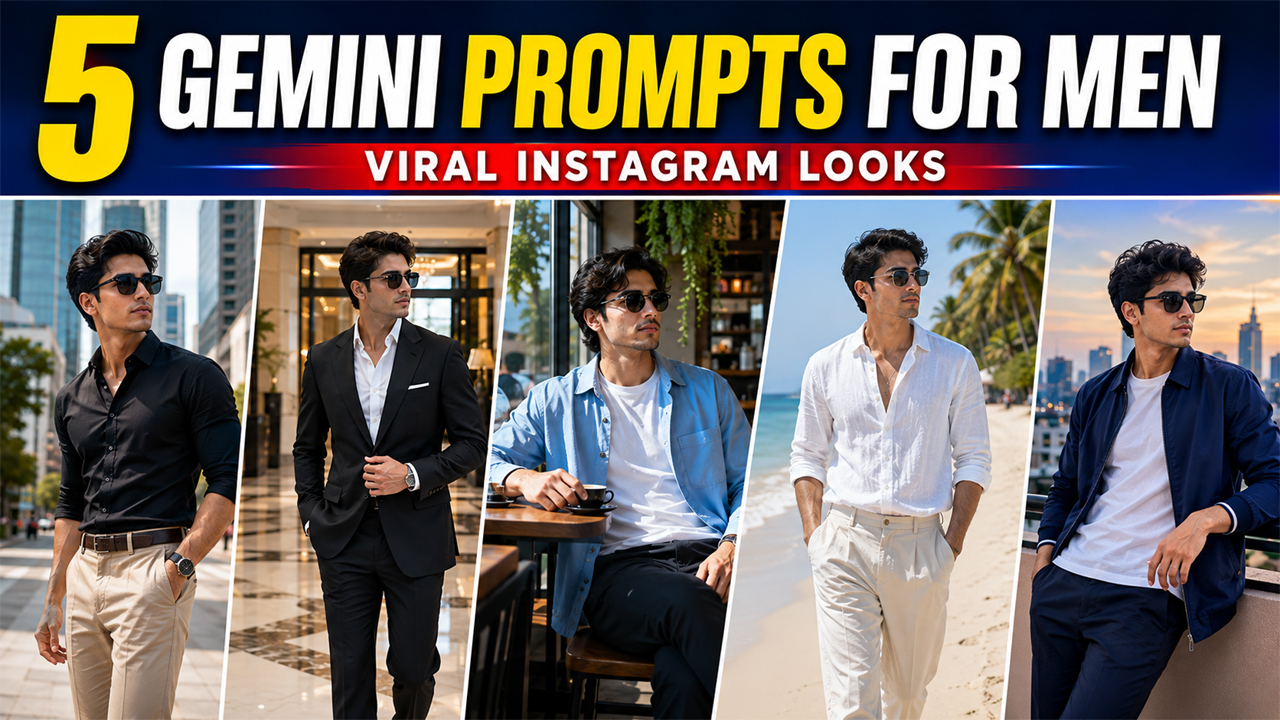
Gemini Prompts for Men That Can Go Viral on Instagram
Prompt Variants (5 variants)
1. Luxury City Street Portrait
Best For - Instagram fashion posts Profile pictures Men's style pages Urban lifestyle content
2. Classic Black Suit Portrait
The combination of a tailored suit and bright luxury environment creates a polished Instagram aesthetic without making the image look overly artificial.
3. Casual Coffee Shop Aesthetic
Instagram Style - This type of photo works especially well for: Lifestyle + Fashion + Coffee + Men's Aesthetic
4. Beachside Summer Look
For this type of image, natural sunlight is better than dramatic lighting. It keeps the skin realistic and gives the final image a more authentic Instagram appearance.
5. Modern Rooftop Evening Portrait
For a more premium Instagram aesthetic, a rooftop setting can create an impressive composition. However, instead of making the background completely black, use soft city lights and enough ambient illumination to keep the photograph clear.
Overview
5 Stunning Gemini Prompts for Men That Can Go Viral on Instagram
Instagram par ek strong photo sirf achhe outfit ki wajah se attractive nahi lagti. Lighting, background, pose, camera angle, color balance aur overall mood milkar photo ko premium look dete hain. Isi wajah se AI photo editing prompts ka trend kaafi popular ho raha hai.
Google Gemini ki help se aap apni existing photo ko completely different style me transform kar sakte hain. Sabse achhi baat ye hai ki aap apna face aur natural identity maintain rakhte hue outfit, location, lighting aur photography style ko change kar sakte hain.
Agar aap Instagram ke liye stylish, realistic aur high-quality men's portraits create karna chahte hain, to neeche diye gaye prompts try kar sakte hain.
Important: Har prompt use karte waqt apni clear, high-resolution photo upload karein. Face ko natural rakhein aur unnecessary skin smoothing ya artificial facial changes se bachne ke liye prompt ki instructions ko exactly follow karein.
How to Use These Gemini Prompts
Getting the best result depends not only on the prompt but also on the quality of the photo you upload.
Step 1: Choose a Clear Photo
Use a photo where your face is clearly visible. Avoid extremely blurry images, heavy filters or photographs where your face is partially hidden.
Step 2: Upload Your Photo to Gemini
Open Google Gemini and upload the photograph you want to edit. Make sure the image is clear enough for Gemini to understand your facial features.
Step 3: Copy One Prompt
Choose one of the five prompts above and paste it along with your uploaded image.
Step 4: Check the Face
After generation, compare the result with your original photograph. Your facial identity should remain natural rather than looking like a completely different person.
Step 5: Refine the Result
If something looks wrong, ask Gemini to make a small correction instead of generating the entire image repeatedly.
For example:
Keep my face and outfit unchanged. Make the background brighter and more natural, reduce the artificial skin smoothing, and improve the realistic daylight.
Tips for More Realistic Gemini Photos
If you want your AI-generated Instagram photos to look believable, keep these points in mind:
Use Natural Lighting
Bright daylight, window light and soft sunset light usually produce more realistic results than extremely dramatic lighting.
Don't Overdo the Effects
Too much HDR, glow, blur or cinematic color grading can make an image immediately look AI-generated.
Keep the Background Detailed
A completely blurred or empty background can sometimes make the subject look artificially inserted. A realistic environment with subtle details generally looks better.
Don't Change Your Face Too Much
If the goal is an Instagram photo using your own identity, specifically tell Gemini to preserve your facial structure, hairstyle and natural skin texture.
Use High-Quality Reference Photos
A clear original photo gives the AI more useful information and generally produces a better result.
Why These Prompts Are Good for Instagram
Instagram photography is highly visual, so the first impression matters. These prompts focus on several elements that make a portrait more attractive:
Clean composition
Natural lighting
Stylish clothing
Realistic environments
Confident but natural poses
Premium photography
Balanced colors
Authentic facial details
Most importantly, the prompts avoid relying entirely on dark backgrounds or exaggerated effects. Bright environments, natural shadows and realistic colors can make the final image look much more like an actual photograph.
Frequently Asked Questions
Can I use these prompts with my own photo?
Yes. Upload a clear photograph of yourself to Gemini and use the prompt with it. The prompts specifically instruct the AI to preserve your identity.
Which prompt is best for Instagram?
It depends on your content style. The city fashion and rooftop concepts work well for stylish feeds, while the coffee shop and beach concepts are better for lifestyle and travel content.
How can I avoid an AI-generated look?
Use natural lighting, realistic backgrounds, subtle editing and clear instructions to preserve your facial details. Avoid excessive skin smoothing and extreme color effects.
Can I change the outfit?
Yes. You can replace the clothing description in any prompt with your preferred outfit while keeping the rest of the instructions unchanged.
Can I change the location?
Absolutely. You can replace the city, cafe, beach or rooftop setting with another location that matches your Instagram theme.
Why does my face sometimes look different?
AI image generators may sometimes modify facial details. Using a clear reference image and explicitly asking Gemini to preserve your facial identity can help reduce unwanted changes.
Final Thoughts
Creating an attractive men's Instagram portrait doesn't always require an expensive photoshoot. With a clear reference image and a well-written Gemini prompt, you can experiment with different outfits, locations, poses and photography styles.
The five prompts in this guide are designed around realistic photography rather than exaggerated AI effects. Whether you prefer a luxury fashion look, casual coffee-shop aesthetic, beach lifestyle photo, classic suit portrait or modern rooftop scene, you can customize the prompts to match your personal style.
For the most natural result, always start with a high-quality photo and keep the lighting, background and editing realistic. A simple, well-composed image often looks much better on Instagram than an image overloaded with artificial effects.
Image



