Gemini Sister Photo Prompts for Instagram
Prompt Variants (5 variants)
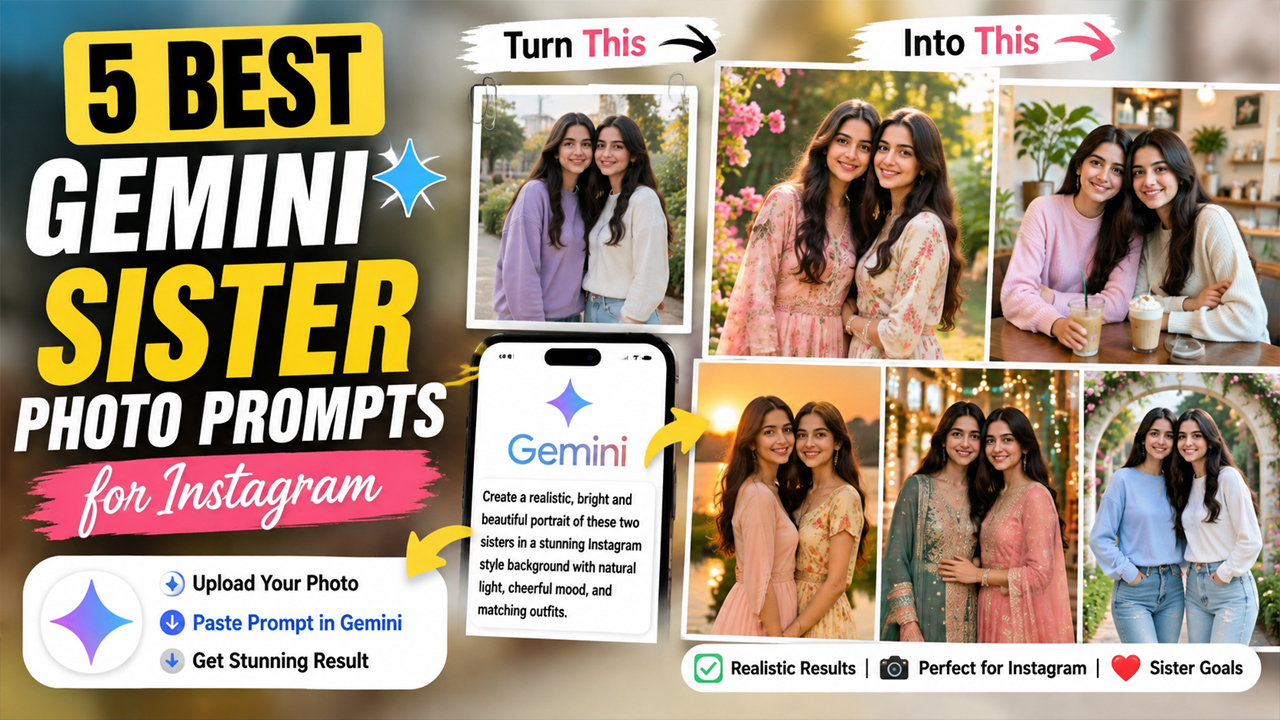
1. Elegant Outdoor Sister Portrait
Why This Prompt Works - The combination of greenery, daylight, and soft depth of field gives the image a fresh Instagram aesthetic. The prompt also specifically asks the AI to preserve facial identity, which is important when editing an existing sister photo.
2. Cute Sister Bonding Photo
Best For - This style works especially well for Instagram posts where you want the photo to feel genuine rather than heavily edited. Natural expressions can make the final image much more believable.
3. Traditional Indian Sister Look
For a more premium result, choose complementary colors rather than making both outfits identical. For example, one sister can wear a soft pastel shade while the other wears a slightly deeper complementary color.
4. Modern Cafe Sister Photo
A café setting gives the photo a modern lifestyle feel without requiring an elaborate background. The natural window lighting also helps keep the final image bright and realistic.
5. Sunset Sister Instagram Portrait
A sunset photo can look beautiful, but extremely dark backgrounds often make AI-generated portraits look artificial. This prompt uses soft golden-hour lighting while keeping the overall image bright and detailed.
Overview
5 Best Gemini Sister Photo Prompts for Instagram
Creating beautiful sister photos for Instagram has become much easier with AI image editing tools like Google Gemini. With the right prompt, you can transform an ordinary photo into a stylish, natural-looking portrait while keeping the person's face recognizable and realistic.
If you are looking for Gemini sister photo prompts for Instagram, these five ideas are designed for different moods—from elegant outdoor portraits to fun sister-bonding photos. Each prompt focuses on realistic lighting, natural skin texture, attractive backgrounds, and Instagram-ready composition.
For the best results, upload a clear photo of yourself and your sister to Gemini before using one of the prompts below.
How to Use These Gemini Sister Photo Prompts
Using these prompts is simple. You don't need professional photo-editing knowledge.
Step 1: Choose a Clear Photo
Select a photo where both sisters' faces are clearly visible. Avoid extremely blurry images or photos with faces covered by sunglasses, masks, or heavy shadows.
Step 2: Upload the Photo to Gemini
Open Google Gemini and upload the original sister photo you want to transform.
Step 3: Copy One Prompt
Choose one of the five prompts above and paste it along with your uploaded image.
Step 4: Check the First Result
If the result looks too artificial, ask Gemini to make the image more natural while keeping the original facial identity unchanged.
You can use a follow-up instruction such as:
Make the result more photorealistic and natural. Keep both faces unchanged. Improve the lighting and skin texture, keep the background bright and realistic, and remove any artificial-looking details.
Step 5: Try Different Styles
You don't have to use the same prompt every time. Try the outdoor portrait for a classy post, the café version for a modern lifestyle photo, or the traditional Indian version for festivals and family occasions.
Tips for Better Gemini Sister Photos
Use a high-quality original photo: The clearer the uploaded image, the easier it is for the AI to preserve facial details.
Avoid extreme lighting: Photos with heavy shadows can make facial reconstruction less accurate.
Don't over-edit: Asking for realistic skin texture and natural expressions usually produces a better result than requesting excessive beauty filters.
Keep the background balanced: A bright, simple background generally looks more natural than an extremely dramatic environment.
Use vertical composition: A 4:5 portrait composition works particularly well for Instagram feed posts.
Keep expressions natural: Small smiles and relaxed poses often look more believable than exaggerated expressions.
Final Thoughts
These Gemini sister photo prompts for Instagram can help turn ordinary sister pictures into polished, creative portraits without making them look overly artificial. Whether you prefer an elegant outdoor shoot, a casual café moment, a traditional Indian look, or a warm golden-hour portrait, you can choose the style that matches your Instagram feed.
The most important part is the original photo. Start with a clear image, use one prompt at a time, and make small adjustments if the first result isn't exactly what you want.
For the most realistic results, always prioritize natural lighting, realistic skin texture, authentic expressions, accurate facial identity, and a bright background rather than excessive effects.
Frequently Asked Questions
1. Can I use these prompts with my own sister's photo?
Yes. Upload a suitable photo containing both sisters and use the prompt to create the desired style.
2. How can I prevent the image from looking AI-generated?
Ask for realistic skin texture, natural expressions, accurate facial proportions, realistic hands, and natural lighting. Avoid excessive filters and unrealistic effects.
3. Why does my Gemini image have a dark background?
AI models sometimes create dramatic lighting when prompts mention cinematic or sunset photography. Specify that the background should remain bright, visible, clean, and naturally exposed.
4. Which format is best for Instagram?
A vertical 4:5 composition is a strong choice for Instagram feed portraits.
5. Can I change the outfits using these prompts?
Yes. You can replace the outfit description with your preferred clothing style while keeping the rest of the prompt unchanged.
6. Can these prompts create realistic outdoor photos?
Yes. The outdoor prompts specifically emphasize natural daylight, realistic backgrounds, natural skin texture, and professional photography.
Image