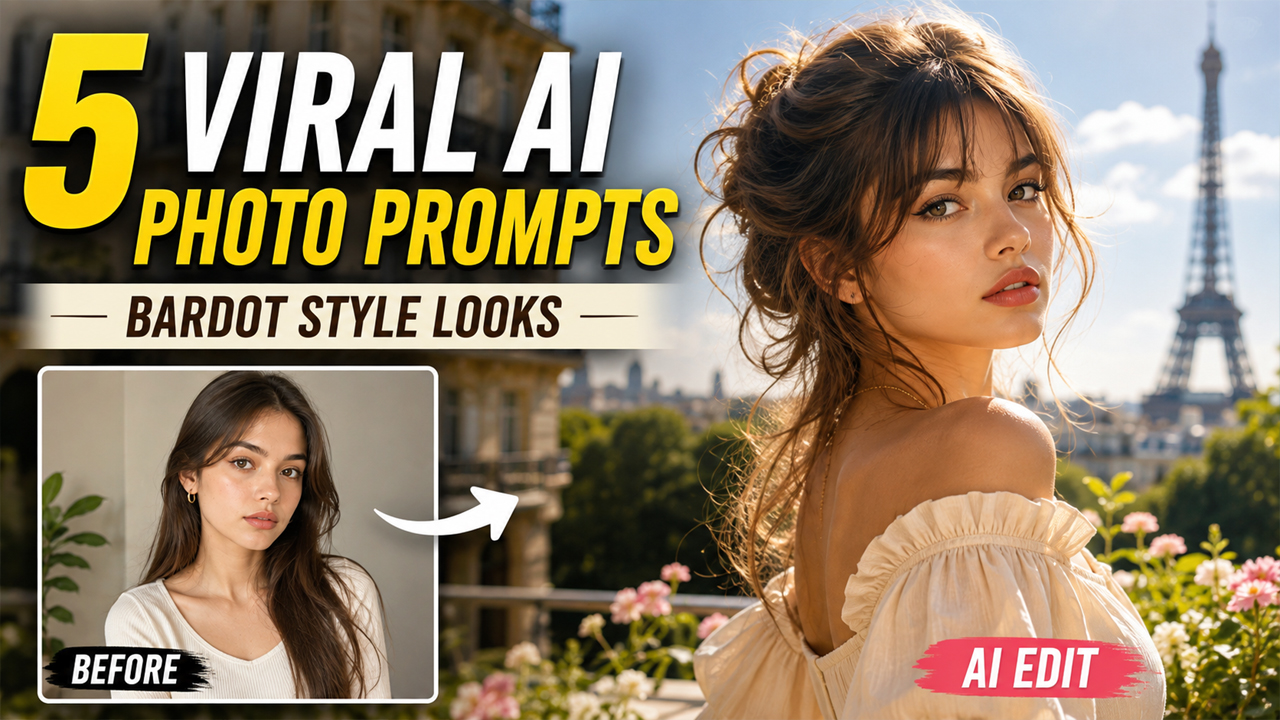
Viral AI Photo Editing Prompts for Girls Stunning Bardot Style Looks
Prompt Variants (5 variants)
1. Classic Bardot-Inspired Street Fashion Portrait
Why This Prompt Works - The combination of neutral clothing, natural daylight and an uncluttered background creates a premium fashion-photo appearance. Instead of making the background extremely dark, the prompt uses soft daylight and light architecture, which helps the subject remain clearly visible.
2. Soft Parisian Café Aesthetic
Best For - This style works especially well for: Instagram profile pictures Fashion posts Pinterest-style portraits Birthday photos Social media thumbnails Aesthetic photography The bright café environment also makes the final image feel more natural and visually appealing.
3. Golden-Hour Bardot Fashion Look
What Makes It Different? - This prompt focuses on natural outdoor beauty instead of an artificial studio environment. The garden background gives the photo depth while the warm sunlight creates a subtle glow around the subject. For a more realistic result, don't ask the AI to make the skin "perfect." Natural skin texture usually makes an AI portrait look more believable.
4. Modern Bardot Editorial Studio Portrait
Why Use a Light Studio Background? - A light beige or ivory background keeps attention on the face while making the overall image look cleaner. It also prevents the common AI-photo problem where the background becomes extremely dark and makes the portrait look artificial.
5. Effortless Beachside Bardot Look
For a relaxed and stylish summer portrait, a bright beach setting can work beautifully.
Overview
5 Viral AI Photo Editing Prompts for Girls to Create Stunning Bardot-Inspired Looks
AI photo editing has completely changed the way people create stylish portraits. Instead of spending hours choosing locations, outfits, lighting and poses, you can now use an AI image editor to transform an ordinary photo into a polished fashion-style portrait.
One of the most popular aesthetics is the Bardot-inspired look—soft, feminine, elegant and effortlessly glamorous. The style is inspired by classic European fashion photography, with relaxed hair, sophisticated outfits, natural expressions and an editorial atmosphere.
The best part is that you don't need to completely change your identity. You can upload your own photo and ask the AI to preserve your facial identity while upgrading the styling, lighting, outfit and background.
In this guide, you'll find 5 original AI photo editing prompts for girls designed for realistic and attractive results. These prompts focus on bright surroundings, natural skin texture, soft daylight and realistic photography instead of overly dramatic or artificial AI effects.
How to Use These AI Photo Editing Prompts
Creating these portraits is simple if your AI image editor supports photo uploads and image editing.
Step 1: Choose a Good Photo
Start with a clear photograph where your face is visible. Avoid extremely blurry or heavily filtered images.
A front-facing or slightly angled portrait usually works best.
Step 2: Upload Your Photo
Upload the photo into your preferred AI image-generation or editing tool.
Make sure the tool allows image-to-image editing or photo references.
Step 3: Copy One Prompt
Choose one of the five prompts above and paste it into the AI editor.
The prompts are written to preserve your identity while changing the styling, environment and photography aesthetic.
Step 4: Generate the Image
Allow the AI to process the image. If the first result isn't perfect, try generating another variation rather than completely changing the prompt.
Step 5: Improve the Result
If the background is too dark, add:
Keep the entire background bright, naturally exposed and clearly visible with soft daylight.
If the skin looks artificial, add:
Preserve natural skin pores, subtle texture and realistic facial details without excessive smoothing.
If the image looks too artificial, add:
Make the final image resemble an authentic professional photograph rather than an AI-generated image.
Tips for More Realistic AI Girl Portraits
1. Use a High-Quality Original Photo
The better your uploaded photo, the easier it is for the AI to understand facial details.
2. Don't Overdo the Beauty Effects
Extreme skin smoothing can make the image look artificial. Natural texture generally produces a more realistic result.
3. Keep Lighting Natural
Soft daylight, window light and golden-hour lighting can make AI portraits look much more photographic.
4. Use Simple Backgrounds
A complicated background can sometimes cause strange objects or distorted details. Clean streets, cafés, gardens and beaches are usually easier for AI to render naturally.
5. Ask AI to Preserve Your Identity
Always tell the AI to preserve the original facial structure and recognizable features when editing your own photograph.
6. Avoid Extremely Dark Backgrounds
For social media photos, a bright background with balanced exposure often looks more attractive and natural than an almost-black cinematic background.
Why Bardot-Inspired AI Photos Are Trending
The appeal of this aesthetic comes from its simplicity. Instead of relying on excessive makeup, dramatic effects or complicated outfits, the style combines natural beauty with sophisticated fashion.
AI tools can recreate the general visual language of classic European fashion photography while allowing users to customize the hairstyle, outfit, location and lighting.
The result can feel both vintage-inspired and modern.
The key is to keep the edit realistic. When the AI changes too many characteristics at once, the final image can lose the natural appearance of the original photograph.
Frequently Asked Questions
Can I use these prompts with my own photo?
Yes. These prompts are designed around uploading your own image and asking the AI to transform the styling while maintaining your recognizable facial features.
Which photo works best?
A clear, well-lit portrait with your face visible works best. High-resolution photos generally provide better results.
How can I make the AI image look realistic?
Use instructions such as natural skin texture, realistic hair strands, balanced exposure, authentic shadows and professional photography. Avoid excessive beauty filters.
Why does my AI background become dark?
Some image generators interpret words such as "cinematic," "dramatic" or "moody" as low-key lighting. If you want a bright image, specifically request a naturally exposed, bright background with soft daylight.
Can I change the outfit?
Yes. You can replace the outfit description in any prompt with your preferred clothing style while keeping the rest of the prompt unchanged.
Can I use these prompts in Gemini?
Yes, if the version of Gemini you are using supports uploading and editing images. Upload your photo and provide the prompt along with it.
Can I create a different background?
Absolutely. Replace the café, garden, beach or street description with another location such as a luxury hotel, modern city, rooftop, studio or flower garden.
How many times should I generate an image?
There is no fixed number. If the first result isn't right, try another generation and adjust the specific problem rather than changing everything.
Final Thoughts
These 5 viral AI photo editing prompts for girls are designed to create stylish Bardot-inspired portraits without making the final image look overly artificial. From a bright Parisian café to a sunny garden and a beautiful beachside setting, each concept gives you a different way to transform an ordinary photograph into a polished fashion portrait.
For the most realistic results, start with a high-quality photo and focus on natural lighting, realistic skin texture, clean backgrounds and authentic facial details. You can also customize the outfits, locations and hairstyles according to your personal style.
The goal isn't simply to make the photo look "AI-generated." The better approach is to create an image that looks like it was captured by a professional photographer—with your own identity still recognizable.
Image